Showing posts with label cellular Internet. Show all posts

Wednesday, August 28, 2024

Hotspots for Fixed and Mobile Business

By: John Shepler

You need connectivity and you need it wherever you are. In the office, no problem. But what if you need to pick up your office and take it to another location at a moment's notice? What if you need to conduct business on the road or on the waves. Yes, that’s right. What if you need to connect from your boat? Are you set for that? OK, how about overseas?
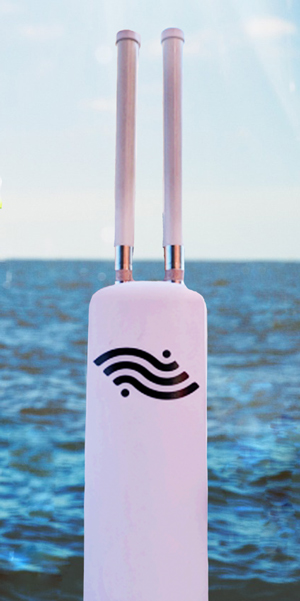
Get Internet service anywhere, on land or sea.Your Smartphone as a Hotspot
There’s a lot of business we can do right from our cellphones. Certainly, voice conversations. Text and short email messaging work great. You can access sites on the Internet using a browser or apps. Maps are great for find your way around.

When it gets a little more complicated you want to use your tablet or laptop. Then you have a decent size screen and you can upload or down load files or easily work on documents and images. Oh, no. The other devices you want to use don’t have any connectivity except WiFi. There’s no WiFi nearby.

Actually, there is. You just need to turn on the hotspot feature in your phone. You log-in using the passcode your phone provides and your other device now shares the broadband on your phone.

Business Grade Portable and Mobile Hotspots
A smartphone hotspot can be a lifesaver in a pinch. But it has limitations. A dedicated portable or mobile hotspot designed for business has a lot more capability. A good example is the Surf & Turf Router from Infinite Wireless. This device is equipped with two external antenna rods and can pull in 4G LTE from over 20 miles away. That’s important when you’re on the boat well away from shore. It supports up to 16 simultaneous devices on WiFi. Instead of a SIM card this one uses vSIM to support multiple carriers and will select the carrier with the strongest signal. It also works in 135 countries.

Other business oriented hotspots are may support one or more carriers and are designed to let you get connected quickly for pop-up stores or on-site business, such as construction work. When your work is only scheduled for the short term, there is no reason to pay for and wait for a fixed line installation. You can choose to access via WiFi or set up a wired Ethernet network on-site.

Wireless is the New Wired Internet
It may not be long before you access the Internet in one of two ways: Fiber optic broadband or wireless broadband. Cable is still a hybrid fiber/copper system, but will likely move more and more to fiber, especially as other fiber network competitors build-out in cable areas. The cellular wireless companies, such as T-Mobile, Verizon and AT&T are now pushing hard for fixed location broadband service using hotspot boxes that are easily installed and moved by customers, as needed. Service gaps are being filled-in by geosynchronous or LEO satellite constellations.

What are your business needs? Do you require extreme bandwidth for a fixed location network? Do you need quick connectivity for mobile or temporary locations? How about Internet of Things applications that may be installed anywhere but need to attach to the Internet? There are great solutions to all of these situations, and more. Find out what bandwidth solutions are available for your size business and budget.


Click to check pricing and features or get support from a Telarus product specialist.


Follow Telexplainer on Twitter


Wednesday, January 25, 2012

Mobile Wireless 3G Broadband

Most of us are now broadband dependent. We really can’t function if we can’t get connected to the Internet. That’s meant a wireline solution for the home and office and whatever on the go.

Get mobile wireless broadband nowWhatever? Wireless standards are all over the map. LAN technology has long settled on 10/100 Ethernet with Gigabit Ethernet the emerging standard that's backwards compatible with earlier 10/100 standards. For wireless, the one common thread is WiFi. Nearly every wireless device can now communicate on a WiFi 802.11 b/g/n network. That would be great if you could connect to WiFi everywhere you go. Unfortunately, that’s far from the case.

One solution is to use a WiFi router at home or in the office and then go out in search of WiFi hotspots all over town. We hang out in our favorite restaurants and coffee shops to be able to connect our computing devices. In-between we simply go without.

The only nationwide wireless broadband network available is the cellular phone network. Cell phone towers were originally erected to provide a cordless mobile phone telephone service. It wasn’t long before the cell phone channels were doing double duty. Some were still assigned to carry phone conversations. Others were set up to transport Internet data. The latest technology is 4G. It’s fast and reliable, but it is still in the process of deployment. Can you get 4G? Maybe, maybe not. It depends on where you are. The established standard is 3G wireless. it’s available just about everywhere and gives you the same bandwidth performance as a basic DSL service. In many cases, it works as well as the T1 line at the office.

Many people have 3G wireless plans on their smartphones. That’s an excellent way to always have broadband with you. Some plans are set up for tethering. You can share your 3G mobile wireless broadband with several other devices using WiFi. In essence, you become the WiFi hotspot everywhere you need one.

That’s great if you happen to have a 3G smartphone with a tethering options. But what if you don’t? Is it possible to have 3G connectivity to your laptop, notebook, tablet or e-reader?

You bet it is. What you need is known as a wireless modem aircard. This is the radio set that connects to the cellular network. How does it connect to your device? There are two methods. For laptop computers, a broadband USB modem just plugs into an open USB connector. This device looks like one of those memory “dongles.” In this case, the primary function is wireless connectivity. It may do double duty if it also has a Micro-SD slot so that you can plug in a memory card up to 32 GB. That way you only need to carry one device for both file storage and wireless connectivity.

A more universal solution is MiFi mobile hotspot. This is a device about the size of a deck of cards that has a wireless modem aircard, battery and WiFi card all built-in. What it does is connect the 3G cellular wireless network to your device using WiFi. There are no wires involved. You can support up to 4 WiFi enabled devices from your MiFi anywhere you can get a cellular signal.

How much does it cost to get mobile wireless 3G broadband? DataJack has plans starting at under $10 for 200 MB. That’s pretty light duty for email and some Web browsing. If you need more, pick a 500 MB, 1GB or 5GB plan. They’ve got a chart to help you pick the right size wireless plan. The 200 MB plan is good for some 800 Web pages or 20,000 emails a month. The big 5GB plan will cover 20,000 Web Pages or 500,000 emails a month. These are just estimates, of course. Downloading music, video or apps will burn through those MB faster than general Web browsing or email activity.

If you go to a cell phone store to buy 3G wireless, they’ll hand you a 2 year contract to sign. Buy your plan through DataJack and you’ll have nationwide coverage (check the map to be sure your area is covered) with no contact, no termination fees and no activation fee. if you decide you don’t really need it anymore, you aren’t stuck for months or years paying through the nose.

By the way, another great use for one of these 3G wireless services is backup for your desktop computer. How big of a disaster is it if your Cable or DSL goes out while you are in the middle of something important? With a wireless option, you can keep working on the Internet during outages plus have mobile capability the rest of the time.

Does this sound like the service you’ve been wanting but didn’t know was available? Learn more, check coverage and order your DataJack Mobile Wireless 3G Broadband service now.

Get more information and order your 3G mobile wireless now!


Follow Telexplainer on Twitter